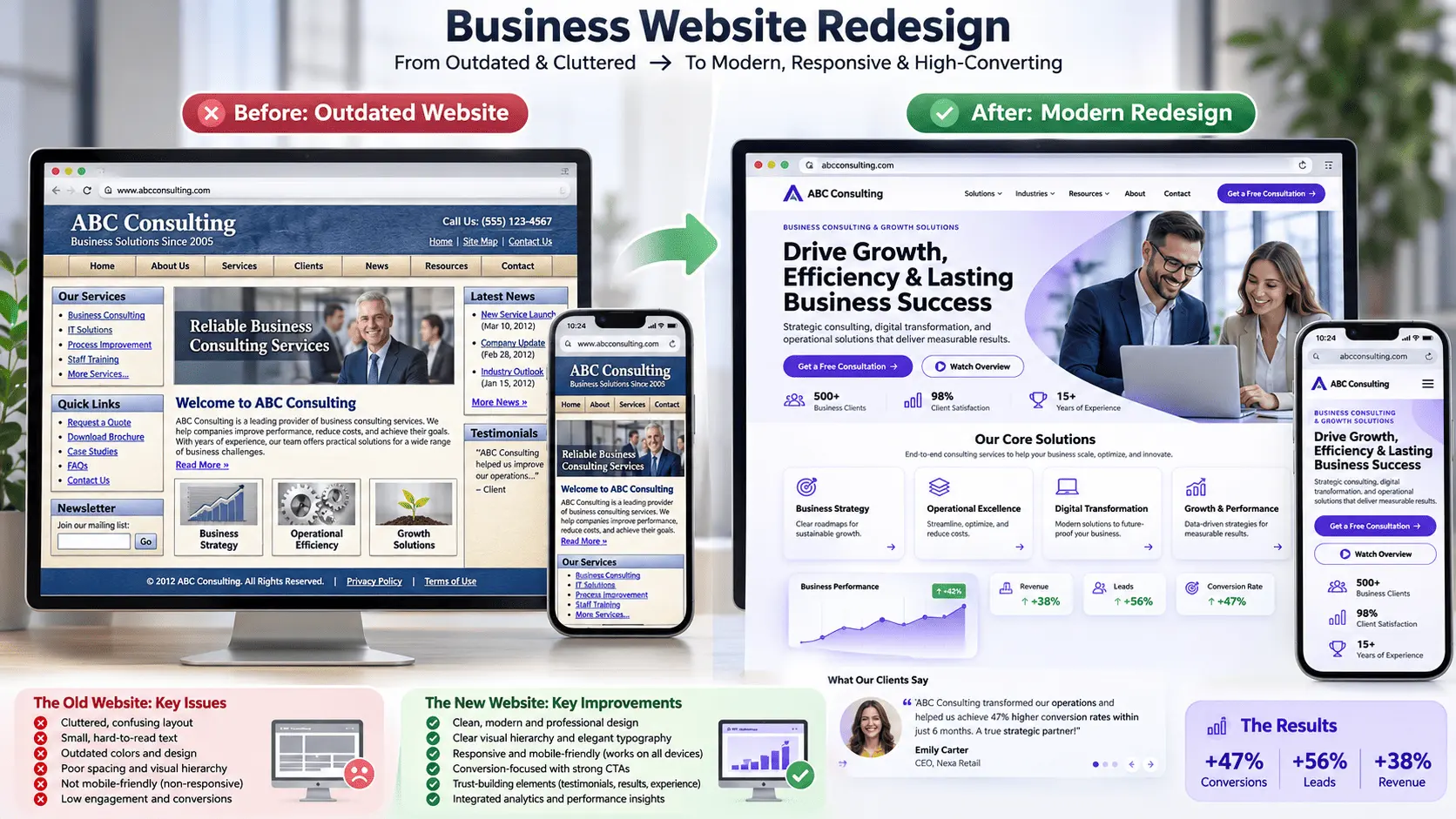
Your business has a website. It looks okay, contains information about your services, and has been online for a few years.
But here's an important question:
Is your website actually helping your business grow, or is it silently costing you potential customers?
Think about it. A potential customer discovers your business through Google, clicks on your website, and expects a professional experience. Instead, they encounter outdated design, slow-loading pages, confusing navigation, or a website that barely works on their phone.
What happens next?
They leave and look for another business.
Your website is often one of the first impressions people have of your brand. If it doesn't communicate professionalism, build trust, or make it easy for visitors to take action, you could be missing valuable opportunities.
The problem is that many businesses don't realize their website needs attention until their competitors start providing a better online experience.
Whether you launched your website five years ago or just a couple of years back, its design and functionality may no longer meet modern customer expectations.
In this guide, we'll explore 10 important signs your business website needs a redesign in 2026, explain why they matter, and show you what you can do to improve your website.
Let's get started.
1. Your Website Looks Outdated and Unprofessional
First impressions matter, especially online.
If your website still uses an old-fashioned layout, outdated typography, inconsistent colors, low-quality images, or cluttered sections, visitors may question whether your business is keeping up with modern standards.
An outdated website doesn't automatically mean your business is outdated. However, your online presence should reflect the quality and professionalism of the services you provide.
Consider these common design problems:
Outdated page layouts and typography.
Poor spacing and inconsistent alignment.
Low-resolution or irrelevant images.
Too many colors and unnecessary design elements.
Inconsistent branding across different pages.
Difficult-to-read text and headings.
Why it matters:
Visitors often make quick judgments about a business based on its online presentation. A confusing or neglected design can make it harder to establish trust.
What you should do:
Consider redesigning your website with a modern visual identity, consistent branding, clear content hierarchy, professional imagery, and an easy-to-understand layout.
Your website should communicate your business value within seconds.
2. Your Website Doesn't Work Properly on Mobile Devices
More people browse websites using smartphones and tablets, making mobile responsiveness an essential part of modern website design.
If visitors need to zoom in to read text, struggle to click buttons, or scroll horizontally to view content, your website is creating unnecessary frustration.
Common mobile design problems include:
Text that appears too small.
Buttons that are difficult to tap.
Images extending beyond the screen.
Navigation menus that don't work correctly.
Sections that overlap or break on smaller screens.
Forms that are difficult to complete.
Why it matters:
A poor mobile experience can discourage visitors from exploring your services or completing an inquiry.
Google also uses the mobile version of website content for indexing and ranking, making mobile accessibility and content consistency important considerations for SEO.
What you should do:
Your website should use a responsive layout that automatically adapts to different screen sizes.
Test your important pages on smartphones, tablets, and desktop devices. Pay particular attention to navigation, forms, buttons, images, and page readability.
3. Your Website Takes Too Long to Load
Imagine visiting a website, clicking a service page, and waiting several seconds for the content to appear.
Would you patiently wait, or would you return to Google and try another result?
Website speed affects the overall user experience. A slow website can frustrate visitors, interrupt browsing, and create unnecessary barriers to conversions.
Some common reasons websites become slow include:
Oversized and unoptimized images.
Poor-quality hosting.
Excessive plugins and scripts.
Unnecessary animations.
Unoptimized CSS and JavaScript.
Poor caching configuration.
Third-party tools loading inefficiently.
Why it matters:
Slow loading can affect visitor engagement and may negatively influence search performance. Page experience is also an important part of Google's broader search guidance.
What you should do:
Start by testing your website using Google PageSpeed Insights.
Review your Core Web Vitals, optimize images, reduce unnecessary scripts, improve caching, and evaluate your hosting environment.
A redesign can provide an opportunity to rebuild inefficient page structures and improve performance, although speed improvements also depend on technical optimization and hosting.
4. Your Website Has Weak or Confusing Calls to Action (CTAs)
Your website may look attractive and contain excellent information, but what should visitors do after reading it?
If there's no clear next step, you're leaving potential customers guessing.
A call to action (CTA) guides visitors toward a specific action, such as:
Request a Free Quote.
Book a Consultation.
Get Started Today.
Contact Our Team.
Explore Our Services.
Shop Now.
Some websites make the mistake of hiding contact buttons, using vague wording, or placing important CTAs where visitors rarely notice them.
Why it matters:
Your website should guide visitors through a clear customer journey. If people cannot easily understand how to contact you or purchase your services, you may lose valuable inquiries.
What you should do:
Review your important pages and ensure each has a relevant, visible CTA.
Use action-oriented wording, make buttons easy to identify, and place them naturally throughout the customer journey.
Don't overwhelm visitors with too many competing actions. Give each page a clear primary objective.
5. Your Website Navigation Is Confusing
A website should make it easy for visitors to find the information they're looking for.
If users struggle to locate your services, contact details, pricing information, or important pages, your navigation needs improvement.
Common navigation issues include:
Too many menu items.
Unclear page names.
Poorly organized service categories.
Broken navigation links.
Missing breadcrumbs on complex websites.
Important pages hidden deep within the site.
Why it matters:
Confusing navigation increases friction and makes it harder for visitors to explore your business.
It can also make it more difficult for search engines to discover important content when internal linking and site structure are poorly implemented.
What you should do:
Organize your navigation around what your customers actually need.
Keep your main menu simple, use descriptive labels, create logical service categories, and make contact information easy to find.
A well-structured website should feel intuitive rather than complicated.
6. Your Website Is Not Generating Enough Leads or Inquiries
Your website receives visitors, but the number of inquiries, quote requests, or consultation bookings remains disappointing.
This could indicate a conversion problem.
However, before blaming your website design, consider other factors such as traffic quality, pricing, competition, and the relevance of your offer.
Your website may have issues such as:
Unclear service descriptions.
Weak value propositions.
Missing customer testimonials.
Complicated contact forms.
No visible trust signals.
Poorly positioned CTAs.
Landing pages that don't match visitor expectations.
Why it matters:
Website traffic alone doesn't guarantee business growth. Visitors need clear information, reasons to trust your business, and an easy way to take the next step.
What you should do:
Review your website's conversion journey.
Make sure your services are explained clearly, display genuine testimonials or case studies where available, simplify inquiry forms, and use relevant CTAs.
Track form submissions, phone clicks, bookings, and other meaningful actions to understand where visitors are dropping off.
7. Your Website Content Is Outdated or Irrelevant
A beautiful design cannot compensate for outdated information.
If your website still displays old service offerings, incorrect business details, outdated images, expired promotions, or irrelevant content, visitors may question its credibility.
Content problems often include:
Old company information.
Outdated service descriptions.
Incorrect contact details.
Broken links.
Missing or outdated blog posts.
Poorly written page content.
Content that no longer matches customer needs.
Why it matters:
Your website content helps visitors understand what you offer and whether your business is the right choice.
Outdated information can also create problems for search visibility and customer experience.
What you should do:
Review every important page.
Update your service descriptions, contact details, images, and business information. Remove irrelevant content and create useful resources that answer your customers' questions.
If your content structure is no longer suitable, a website redesign may be the right opportunity to reorganize everything.
8. Your Website Is Difficult to Update and Manage
Your business changes over time. You introduce new services, update pricing, publish articles, and improve your offerings.
But what happens if making a simple website update requires contacting a developer every time?
An unnecessarily complicated website management system can slow down your business operations.
Common problems include:
No easy content management system.
Difficult blog publishing workflows.
Complicated page editing.
Too many unnecessary plugins.
Outdated software and dependencies.
Poorly organized website administration.
Why it matters:
Your website should support your business, not create additional administrative work.
If routine updates are difficult, your content may become outdated and your team may spend unnecessary time managing basic changes.
What you should do:
Consider a website built with a suitable content management system, such as WordPress, or a custom solution with an easy-to-use administration dashboard.
Choose a platform that matches your business requirements and gives authorized team members the ability to manage content efficiently.
9. Your Website Doesn't Reflect Your Current Brand Identity
Has your business evolved since your website was first launched?
Perhaps you've introduced new services, updated your logo, changed your messaging, or started targeting a different audience.
But your website still represents the business you were several years ago.
This creates a disconnect between your current brand and your online presence.
Some warning signs include:
Old branding and logo variations.
Inconsistent brand colors.
Outdated messaging.
Services that no longer represent your business.
Visual elements that don't match your social media profiles.
A website that doesn't communicate your current positioning.
Why it matters:
Brand consistency helps customers recognize your business and understand what you stand for.
Your website should reflect your current identity, not an outdated version of your company.
What you should do:
Update your website's visual identity, messaging, images, typography, and service presentation.
Make sure your website communicates the same brand personality across your marketing channels.
10. Your Website Is Falling Behind Your Competitors
Take a look at the websites of businesses competing in your industry.
Are their websites easier to navigate? Do they have clearer service pages, better mobile experiences, more useful content, or stronger conversion paths?
If your website feels significantly behind the competition, it may be time to rethink your online strategy.
This doesn't mean copying another business's design. It means understanding what customers expect and identifying opportunities to improve your own website.
Look for differences in:
Website usability.
Mobile responsiveness.
Page speed.
Service presentation.
Content quality.
Trust signals.
Lead generation features.
Overall user experience.
Why it matters:
Customers often compare multiple businesses before making a decision. Your website should communicate your strengths clearly and make it easy for potential customers to choose your business.
What you should do:
Conduct a competitor website review.
Identify gaps in your current website, prioritize improvements, and build a digital experience that communicates your unique value.
The objective isn't to have the most complicated website in your industry. It's to create a more useful experience for your target audience.
Website Redesign vs. Website Refresh: What's the Difference?
Not every website problem requires a complete redesign.
Sometimes, a few targeted improvements can solve the issue.
Here's how the two approaches differ:
| Website Refresh | Complete Website Redesign |
|---|---|
| Updates visual elements | Rebuilds the overall experience |
| Changes colors and typography | May introduce a new design system |
| Improves selected sections | Reorganizes the entire site structure |
| Updates images and content | May involve rewriting and restructuring content |
| Makes limited functionality improvements | Can introduce new features and integrations |
| Usually smaller project scope | Usually larger project scope |
A website refresh is useful when your existing structure works well but certain design elements need improvement.
A complete redesign makes more sense when your website has deeper problems involving functionality, user experience, technical structure, or business objectives.
Before deciding, evaluate what is actually preventing your website from performing effectively.
What Should You Focus on During a Website Redesign?
If you've identified several of these warning signs, don't redesign your website just for the sake of having something new.
Use the opportunity to improve the entire digital experience.
Here are some important priorities:
1. Modern, Professional Design: Create a consistent visual identity that reflects your business and builds confidence.
2. Mobile-First Experience: Ensure visitors can easily browse and interact with your website across different devices.
3. Better Website Performance: Optimize images, scripts, hosting, and page structure.
4. Clear Conversion Paths: Use relevant CTAs and make it easy for visitors to contact your business.
5. SEO-Friendly Structure: Improve headings, internal links, metadata, crawlability, and technical SEO.
6. Quality Content: Explain your services clearly and address the questions your potential customers actually have.
7. Security and Maintenance: Use appropriate security measures, regular updates, and reliable backups.
8. Analytics and Tracking: Measure traffic, engagement, inquiries, and meaningful conversions.
A successful redesign should improve more than appearance. It should create a stronger foundation for your business's online growth.
Frequently Asked Questions About Website Redesign
1. How often should a business website be redesigned?
There is no fixed redesign schedule. Some businesses may benefit from a major redesign every few years, while others can maintain their websites through regular improvements. Focus on functionality, performance, brand changes, and customer expectations rather than a specific age.
2. How much does a business website redesign cost?
Website redesign costs depend on the number of pages, design requirements, functionality, content, integrations, and technical complexity. A simple visual refresh generally costs less than a complete redesign involving custom development and advanced features.
3. Will redesigning my website improve SEO?
A redesign can create opportunities to improve technical SEO, mobile usability, site structure, page speed, and content quality. However, a redesign does not automatically improve rankings. Poorly managed URL changes, removed content, or broken redirects can even damage existing search visibility.
Always plan URL preservation, redirects, metadata, internal links, and indexing checks before launching a redesigned website.
4. Can I redesign my website without losing existing content?
Yes. You can migrate existing pages, blog posts, images, and other important content into a redesigned website. Proper backups, migration planning, URL mapping, and testing are essential to protect your existing content and search visibility.
5. Is a mobile-friendly website really necessary?
Absolutely. Mobile usability is important because many visitors browse and interact with websites using smartphones. A responsive design helps ensure your content, menus, buttons, and forms remain accessible across different screen sizes.
6. Should I redesign my website or build a new one?
It depends on your existing website's technical condition and requirements. If the current platform is reliable and the issues are mainly visual, a refresh or redesign may be sufficient. If the underlying technology is outdated, difficult to maintain, or unable to support your requirements, rebuilding may be a better option.
7. How long does a website redesign take?
A small website refresh may take a few weeks, while a complete business website redesign can take several weeks or longer. The timeline depends on the project's scope, number of pages, content readiness, custom features, revisions, and testing.
Conclusion: Your Website Should Grow With Your Business
Your website is more than a digital business card. It's an important part of how customers discover, evaluate, and interact with your brand.
If your website looks outdated, loads slowly, performs poorly on mobile devices, or struggles to generate inquiries, it's worth investigating what needs improvement.
You don't necessarily need to replace everything overnight. Start by identifying the biggest problems, understanding your visitors' needs, and prioritizing improvements that support your business goals.
But if your existing website is holding your business back, a strategic redesign could be the step toward creating a stronger online presence.
Ready to Give Your Business Website a Fresh Start?
At The Trio Digitals, we help businesses build and improve their online presence through professional website development, WordPress customization, e-commerce solutions, SEO, digital marketing, and AI-powered automation.
Whether your website needs a complete redesign or targeted improvements, we can help you explore a solution that aligns with your business goals.
Don't let an outdated website define your business. Let's build a better digital experience.
Visit The Trio Digitals and get in touch to discuss your website project.
Website redesign requirements and results vary depending on the existing platform, project scope, business objectives, and technical condition of the website.